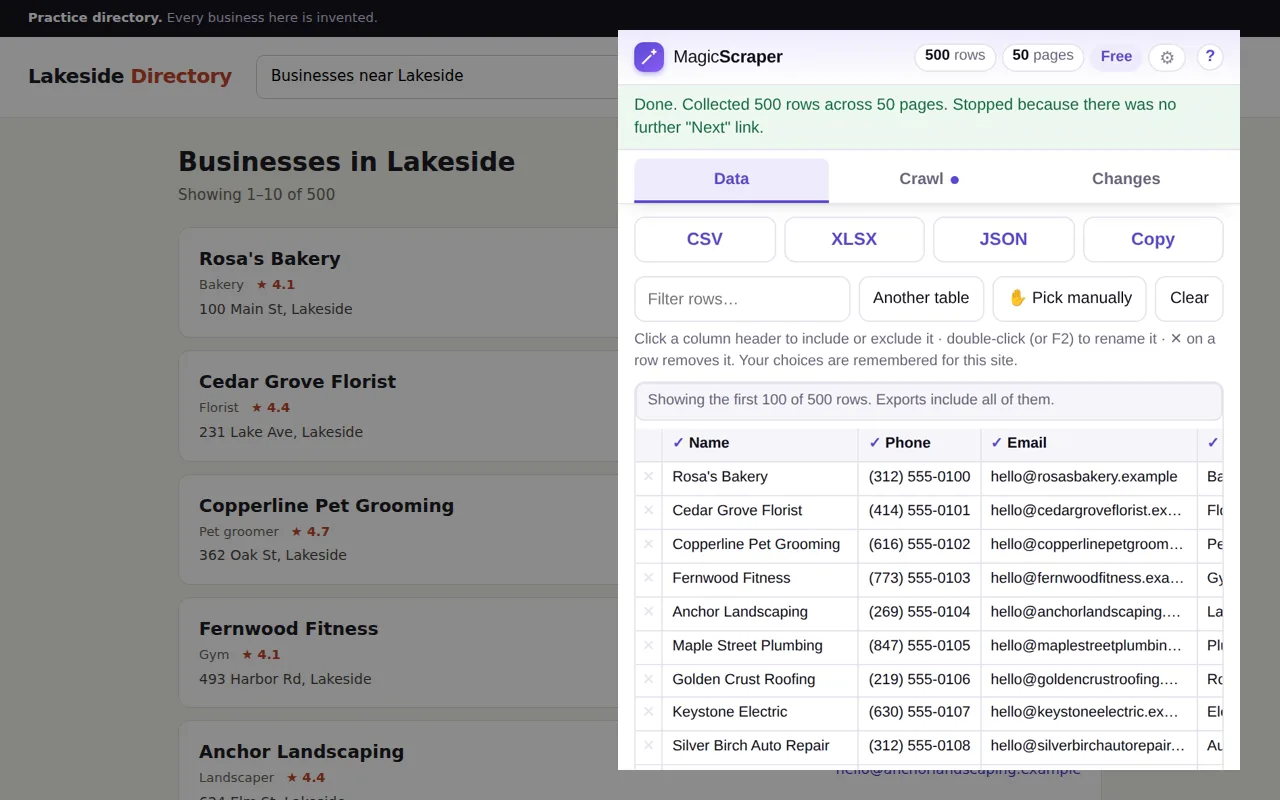
What comes out
One row per business, one column per thing the listing shows: usually the
name, phone, email, address, category and
rating, plus the link to each business's own page. The columns are named
from the directory's own markup, so you get Phone rather than
col_3 — and when a site's names are gibberish, double-click one and
rename it.
What it collects is what the page shows you. If a directory hides the phone number behind a “Show number” button, or only puts the email on each business's own page, see the page behind every listing below.
Four steps, about five minutes
Try it first on something built for practice: the sandbox's 40-page list is fictional and nothing on it is rate-limited.
Open the first page of results
Search the directory the way you always do — a trade, a town — and open the results. Click the extension icon. The listings are already found. Wrong block, like the sidebar of featured ads? Press Another table, or Pick manually and click one listing yourself.
Keep the columns you want
Click a column header to leave it out, double-click to rename it. Filter the rows if you only want one category. All of it is remembered for that directory, so next month's run comes out in the same shape.
Crawl every page
On the Crawl tab press Auto-detect “Next”, then Start crawling. It follows the Next link or the page numbers — or keeps scrolling, on a directory that loads more as you go — pausing a randomised moment between pages, and stops when there are no more. Free, with no page limit.
Export to Excel or CSV
Press XLSX for Excel, CSV for anything else — a CRM import, Google Sheets, a mail-merge. The file is built in your browser and saved to your downloads; the list never passes through a server of ours, because there isn't one.
The page behind every listing
Some directories only show a name and a town in the list.
The email, the website and the opening hours are on each business's own page. Drill-down opens that page for every row in a background tab, takes the fields you confirmed on the first one, and adds them to the row as extra columns. The free version does it for the first three rows, so you can see what comes back from your directory before paying; Pro, a one-time purchase, does every row.
And when the list is split by category or by town, one setup can run over the whole list of result pages — plumbers, electricians, roofers — and merge them into one sheet with a column saying which search each row came from.
Doing it considerately
A crawl loads one page at a time, the way you would clicking through, with a pause between pages. If a directory answers with an HTTP 429 — “slow down” — the extension waits and retries rather than pressing on. If it asks you to prove you're human, the run stops and hands you the tab; it never tries to get past the check.
Whether you may collect from a given directory is between you and that site —
its terms, its robots.txt — and, because listings often name a person
as well as a business, data-protection law such as GDPR where it applies. Contacting
the businesses you collect is covered by the rules on marketing calls and email where
you are.
Reasonable questions
Is it free?
Finding the listings, choosing the columns, crawling every page and exporting to Excel, CSV or JSON are free, with no page limit, no time limit and no account. Drill-down — opening each business's own page — is free for the first three rows and part of Pro past that. Pro is a one-time purchase, not a subscription.
Will it work on the directory I use?
If the results are a list of cards or a table with a Next link, page numbers or infinite scroll, almost certainly. It reads what your browser has already shown you, so a directory you can browse normally is one it can usually read. It can't reach results behind a login you don't have, or anything behind a bot check. The free version is the test: try it on that exact directory.
Can it get the emails if the list doesn't show them?
Only if they're somewhere on the site. When each business's page shows an email that the list doesn't, drill-down collects it from there. It doesn't guess addresses or look them up elsewhere.
How many listings can it collect?
As many as the directory shows. The popup shows a preview and the export includes every row — up to a million. If the tab closes part-way through a long crawl, the rows collected so far are offered back the next time you open the extension on that site.
Does my list get sent anywhere?
No. Detection, crawling and export happen inside your browser, and there is no server for the data to pass through. The only requests it makes are for the directory's own pages, once you press Start crawling. The privacy policy has the detail.