Guide
The data you want is on the next page.
A catalogue gives you name and price. The SKU, the material, the lead time — those only exist on each product's own page. Drill-down collects both in one pass, so you never open two hundred tabs by hand.
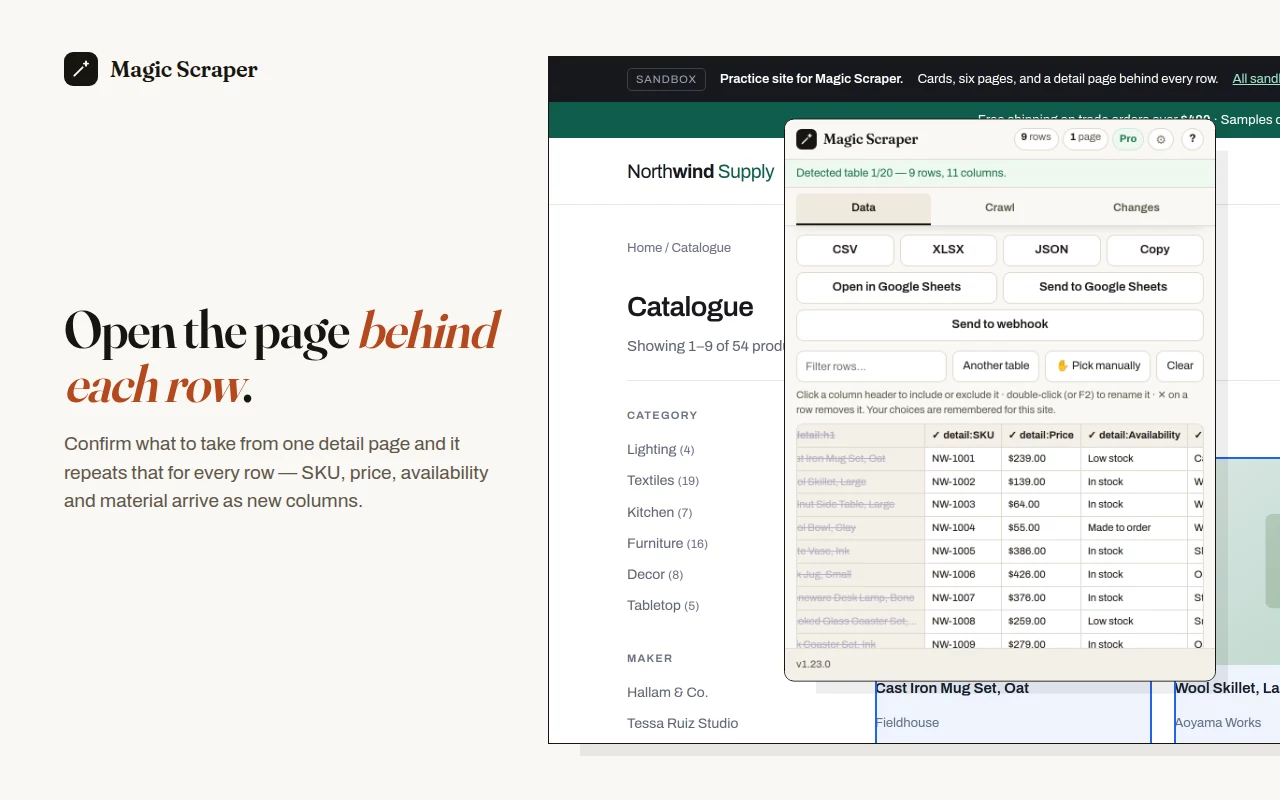
RESULT
Nine rows, each carrying the fields from its own product page —
detail:SKU, detail:Price, detail:Availability,
detail:Material — none of which were in the list.
What drill-down actually does
For each row in your table it opens the page that row links to, in a background tab,
reads the fields you confirmed, closes the tab, and writes those fields back into that
row as new columns prefixed detail:.
You confirm what to take once, on the first page. Everything after that is the same instruction repeated, which is the part worth automating.
Five steps, on a real page
Open the sandbox catalogue in another tab and do these as you read. It has six pages of nine products and a detail page behind every row.
Detect the list
Click the extension icon. The nine products are already found, with columns named
from the page's own markup rather than col_1. Wrong block? Press
Another table to cycle the other candidates, or Pick manually to click
the rows yourself.
Crawl the pagination first
Open the Crawl tab, press Auto-detect "Next", then Start crawling. It walks all six pages and collects 54 rows, pausing a randomised moment between requests. Crawling is free and uncapped — do this part before drilling, so the drill runs over the whole list rather than one page of it.
Point it at the link column
Tick Open each row's link and scrape its page, then choose the column holding each product's URL. The extension tells you how many rows actually have a link there — if it says 0 of 54, you have picked the wrong column, and that is much better to know now.
Confirm on one page before touching the rest
Press Preview the first link. You see precisely what one detail page yields before anything is run at scale. This is the step that stops a 54-page run from collecting the wrong field 54 times.
Run it, then export
The rows fill in as it goes, and the run survives the popup being closed. Export to CSV, XLSX or JSON when it finishes. It also tells you which columns came back mostly empty, which is usually a sign the wrong field was picked.
Going more than one level
Sometimes the thing you want is two clicks past the list.
On the sandbox: a product links to its maker, and the maker links to where
they source materials. Add a second level and a third, confirm each on one row, and
the chain repeats down the whole table. Fields arrive prefixed detail:,
detail2:, detail3: so you can tell which page each came
from.
One thing that matters more than it sounds: the chain follows a link by its label, not by its address. That is why every product on the sandbox links to its maker through an identically-worded "About the maker →". A chain confirmed on one row works on all of them only if the link is labelled the same way — which is how real shops label such links, and the first thing to check if a chain works on row one and fails on row two.
Doing it considerately
Drill-down makes one page load per row. Fifty rows is fifty requests, and the site notices. The pacing setting exists for exactly this and the default is deliberately gentle; if a site answers with an HTTP 429 the extension waits and retries rather than pressing on.
Whether you may collect from a given site is between you and that site — its
terms, its robots.txt, and data-protection law if the rows are about
people. Practise on the sandbox, where none of that
applies because none of it is real.
On a directory, keep to business details — the company, its website, its main phone — and leave out named people unless you need them. Is it legal to scrape a business directory? covers the EU, UK and US rules in plain words.
Reasonable questions
How much does it cost?
Drill-down is the paid feature. Free runs it on the first three rows of any run, so you can see exactly what comes back from your own site before deciding. A one-time licence opens every row. Detection, the manual picker, export and multi-page crawling are free with no limit.
Can I close the popup while it runs?
Yes. The run continues in the background and the results are saved as they arrive, so reopening the popup shows the progress rather than a blank table.
What if some rows have no link?
They are skipped and keep their original columns. The extension tells you up front roughly how many rows have a usable link, so you find out before the run rather than after.
What if the detail pages are on another domain?
That works, and it is why drill-down asks for all-sites access at the moment you switch it on — the domains a row links to are not knowable in advance. Decline the prompt and everything else in the extension keeps working.