Browser extensionIn active development
Scrape any web list into a spreadsheet.
Open the popup and the table is already found — columns named, links kept, ready to export. It follows pagination, opens the page behind each row, and keeps your data yours: no account, no tracking, no server of ours.
Free, with no time limit and no account. v1.23 on both Chrome and Edge. The Chrome listing also installs on Brave, Opera, Vivaldi and Arc — any Chromium browser. New work reaches you as a store update your browser installs on its own, once each batch clears store review.
00:46 Detect, crawl six pages to 54 rows, open the page behind every row, export, then see what changed since last time. Every frame is the extension actually running — on the sandbox you can try yourself.
How a scrape actually goes
Five steps, in the order you'd hit them. Most pages stop at the first one.
It finds the data
Tables, card grids, repeated lists, schema.org markup, open shadow roots
and same-origin iframes. Columns get named from the markup rather than called
col_1. Wrong block? Cycle to the next candidate.
Or you point at it
When a layout is too odd to guess — a table plus a price floating outside it — click the rows, then shift-click the extra elements. Several regions of a page become one table.
It walks the pagination
Finds the Next control, follows URL or click pagination, handles infinite scroll, and
when a site answers with a 429 it waits and retries instead of hammering.
If a site asks you to prove you're human, the run stops and hands you the tab —
it never tries to get past the check. You can stop mid-run and keep what it has —
here it is on a business directory.
It opens the page behind each row
Confirm what to take from one detail page and it repeats that for every row, merging the fields back in as extra columns. Chain several levels deep if the data is buried — how drill-down works.
Then does it for a whole list of pages
Paste the addresses — every category, every town. The page you're on is crawled first, then each address in a tab of its own with the same setup, drill-down included, and each tab keeps its own table. The rows come back as one sheet, with a List column saying where each came from.
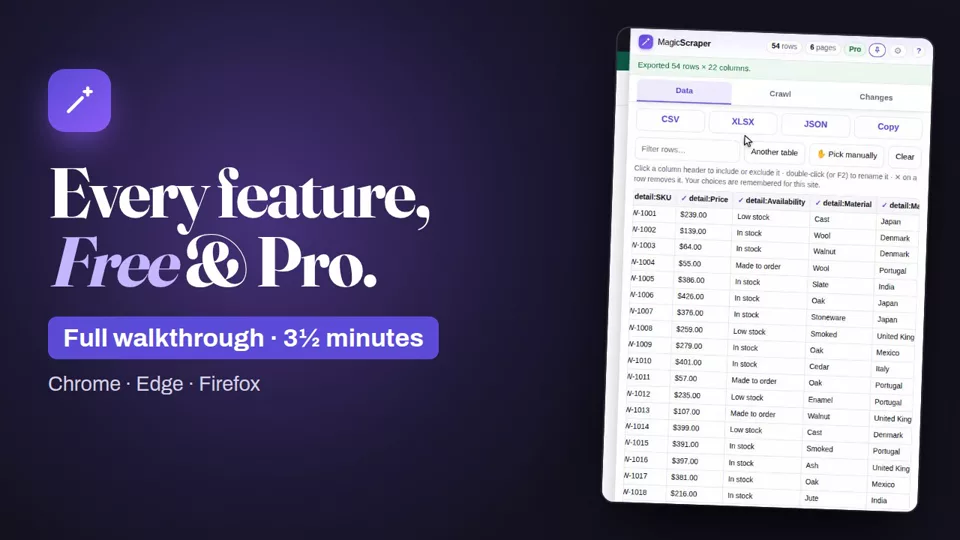
Video: every feature, Free and Pro, in 3½ minutes, with subtitles. It plays from YouTube when you press play.
One payment. Then it's yours.
No subscription, no seats, no account to create. The free tier isn't a trial — it has no clock on it.
Free
$0
Everything except drill-down and the run tooling, no clock on it.
- Detect, pick by hand, export CSV · XLSX · JSON
- Open it in Google Sheets in one click
- Rename columns, drop rows, filter
- Per-site settings remembered
- Crawl pagination — unlimited pages
- Brings back a run that died with its tab
- 3 rows per drill-down
- One setup over a list of pages — the first 2 addresses
The Chrome listing also installs on Brave, Opera, Vivaldi and Arc.
Pro
Founding price · first 100$19 $25
Paid once. Yours permanently, and every update since carries across — there is no second purchase.
- Everything in Free
- Every row drilled, not just three
- Multi-level drill chains run on every row, not three
- Drill-down results kept between sessions
- Name a setup, reuse it, export it
- One setup over a list of pages — every address
- Compare a run with the last one
- Compare with a file — your CRM export or last month's list; the rows marked new are the ones you don't have yet
- Put a setup on a schedule — while your browser is open, and a run missed while it was closed happens when you next open it
- Send rows to Google Sheets or your own webhook — Zapier, Make, n8n or your server — by hand or after every scheduled run
- Works on every browser you use
7-day refund, no questions asked. Crawling is free and uncapped either way. Install the free version first — three drilled rows tell you whether the fields you need come back.
Where your data goes
Only where you send it. Most tools in this category route your scrape through their servers. This one has no servers.
Detection, crawling and export all happen inside your browser. There is no server of ours for your data to pass through, because there is no server of ours.
Detecting a table, picking one by hand and exporting it make no network requests at all — not analytics, not a version check, not a ping. The only requests the free version ever makes are for further pages of the site you are already on, and only once you press Start crawling: the same pages your browser would fetch if you clicked through them yourself.
What it keeps — a run in progress, past runs to compare against — is stored inside the extension, where the website you scraped cannot read it. A file you compare against is read on your computer and never uploaded.
If you buy Pro, activating your licence sends the key to Gumroad once to confirm the purchase. Nothing about the page you're on goes with it, and the check is never repeated.
Pro can also send the rows you choose to a Google Sheet in your own account — only when you press it, straight from your browser to Google, and only into sheets it created — or to a webhook address you set, such as your own server or Zapier. Nothing ever comes to us.
Spelled out in full in the privacy policy.
Somewhere to practise
A sandbox built for exactly this — eleven pages, each one a different thing that breaks scrapers. Nothing on it is real and nothing is rate-limited, so scrape it as hard as you like.
Card catalogue
Six pages of nine, a Next button, and a product page behind every row — which links to its maker, which links to sourcing, and on through the material lot to the standard its auditor worked to. Ten levels, for practising a real drill-down chain rather than a single hop.
Infinite scroll
Rows arrive as you scroll, five batches then it stops. Switch on Infinite scroll in the Crawl tab.
Awkward layout
A discount that belongs to every row but sits outside the table, so nothing can guess it. This is what the manual picker is for.
Then seven harder ones, for when those are too easy: products in a shadow root, a table inside an iframe, JSON-LD and microdata together, a Load more button, a data grid with no table in it, data that is a mess and two tables on one page. All eleven →
What's being built
Two states, kept apart on purpose: what you get if you install right now, and what has not been written yet. Nothing here is charged for before it exists, and an update is never a second purchase.
In the stores now v1.23
In the Chrome Web Store and Edge Add-ons now, as an automatic update.
New in this update
- Open in Google Sheets — one click copies the table and opens a new sheet, ready to paste into. Free
- Send to Google Sheets (Pro) — the rows go straight into a sheet in your own Google account, and a scheduled run keeps adding to it. What it sends
- Send to webhook (Pro) — post the rows to Zapier, Make, n8n or your own server, by hand or after every scheduled run
- Business directories get named columns — Name, Phone, City, State, Postcode, Website — and drill-down reads a member's profile page for its website, fax and social pages
- Research papers: drill-down reads the title, authors, journal, DOI and abstract
- Larger buttons, clearer text, and a shorter settings dialog
Already there
- When the rows on screen each link to a page of their own, the Data tab says so, and Show me takes you to drill-down
- A first install shows where the icon went — new extensions hide in the puzzle-piece menu — and opens a page to try it on
- Keep it open beside the page — pin it to the browser's side panel and it stays while you click, follows the tab you're on, and shows a hand pick as you make it
- Reddit, Amazon, Hacker News, PubMed and arXiv read by name: scores, authors, prices, ratings, DOIs and abstracts in clean columns, page after page. What each one gives
- Wikipedia-style tables get their real headers, two-row headers included
- Cards laid out three to a row come back as one list
- Lists built from web components are found
- Whole image addresses, and the original rather than a resized copy
- Columns no longer named after styling classes
- One setup over a list of pages — the page you're on first, then each address you add in a tab of its own that stays open with its own table, drill-down included — and all of it as one sheet with a List column. Free for two addresses, Pro for the lot
- Compare with a file — a CSV, Excel or JSON file: your CRM export, last month's list, a colleague's. Phone numbers match however they're written
- A “verify you're human” check stops the run and hands you the tab, instead of failing quietly
- Past runs are kept inside the extension, no longer where the website could read them — moved and deleted from the site automatically
- A list you picked by hand now crawls every page, saves into a setup and runs on a schedule
- Scheduled CSVs are named with the date, and a run missed while Chrome was closed happens when you next open it
- Copy a diagnostic report from the menu when something goes wrong — errors only, web addresses removed
- Finds the table and names the columns from the markup
- Pick the rows by hand when it picks the wrong thing
- Crawl pagination or infinite scroll, with no page limit
- Open the page behind each row, up to ten levels deep
- Export CSV · XLSX · JSON, or copy
- Rename and drop columns, filter rows — remembered per site
- Bring back a run that died with its tab — and it is free, not Pro
- Compare a run with the last one — a Changes tab beside Data and Crawl, with the old value struck through beside the new one
- Named setups you can reuse on the next site and hand to a colleague
- Run a saved setup on a schedule — every few minutes, every few hours or once a day, while your browser is open
- Exports up to a million rows, and drilled rows that no longer hit a storage ceiling
Every update, including anything removed or moved to Pro, is in the changelog.
Next: Magic Scraper for Firefox — built and tested, on its way to Firefox Add-ons.
Not written yet
- Reorder columns — you can include, exclude and rename them today, but not drag them around
- Download the image files, not just their URLs
- Video and media URLs — only images are captured now
Press I'd use this on anything you want — that is how the list gets ordered. A vote is anonymous; leave an address only if you want telling when it ships. Something missing? Ask for it on the request board.
Reasonable questions
Do I actually need Pro?
Only if you want the page behind every row. Crawling pagination is free, however many pages — that part isn't metered at all, and if the tab dies partway through a long run the rows are offered back the next time you open the popup, which is also free. Drill-down is the paid feature, and free runs it on the first three rows so you can see exactly what comes back from your own site before deciding. Pro adds saved setups you can name and reuse, running one on a schedule, running one setup over a whole list of pages (free does the first two), and comparing a run with the last one of the same list — or with a file of your own.
Can it tell me which leads I don't have yet?
Yes, with Pro. Scrape the directory, open the Changes tab, and choose Compare with a file — your CRM export, as CSV, Excel or JSON. Every row on the page that isn't in your file is marked new, and Export the changes saves just those. Rows are matched on a column both have, usually the phone number or website, and a phone matches however it's written. The file is read on your computer and never uploaded.
Can it run on a schedule while I'm not there?
While Chrome is open, yes — point a saved setup at a time of day or an interval and it opens the page in a background tab, collects it, saves a CSV and closes the tab again. While Chrome is closed, no. An extension has no way to wake a browser that isn't running, and anyone who tells you otherwise is running a server somewhere. A run that came due overnight happens shortly after you next open Chrome rather than being skipped. If you genuinely need collection on a machine that's asleep, that needs a server, and this deliberately doesn't have one — the done-for-you service is the honest answer there.
Will it work on the site I have in mind?
Probably. It reads what your browser has already rendered, so what you can see, it can usually take. It can't reach closed shadow roots, cross-origin iframes, data only a private API returns, or anything behind a bot challenge — those are limits of the browser itself, not of this extension. When a site does ask you to prove you're human, the run stops and hands you the tab rather than trying to get past it. Try the free version on that exact site before paying.
Am I allowed to scrape a site?
That's between you and the site, and this tool doesn't change the answer. Check its
terms, respect robots.txt where it applies, think about data-protection law
if the rows are about people, and don't hammer anyone — the speed setting is there for
exactly that, and the default is deliberately gentle.
What if I change computer?
Paste the same key. One licence covers every browser and machine you use. There's no device count, nothing to deactivate, and no login to lose.
Who's behind it?
Magic Scraper is built and supported by the team that wrote it, so a reply to support comes from someone who can actually fix the thing you hit — not from a queue.