Guide
When a scraper finds nothing.
It worked on the demo, then on the site you actually need it says it doesn't support it, or exports an empty sheet. Here is why that happens, what to try in the next minute, and which sites no honest tool should promise you.
Try these first
Let it finish loading
Many pages draw their rows a second or two after the page appears, or only as you scroll. Wait, scroll down once, then click the icon again.
Press Another table
A page often has several lists: menus, filters, related items. If the outline is on the wrong one, cycle to the next.
Pick it by hand
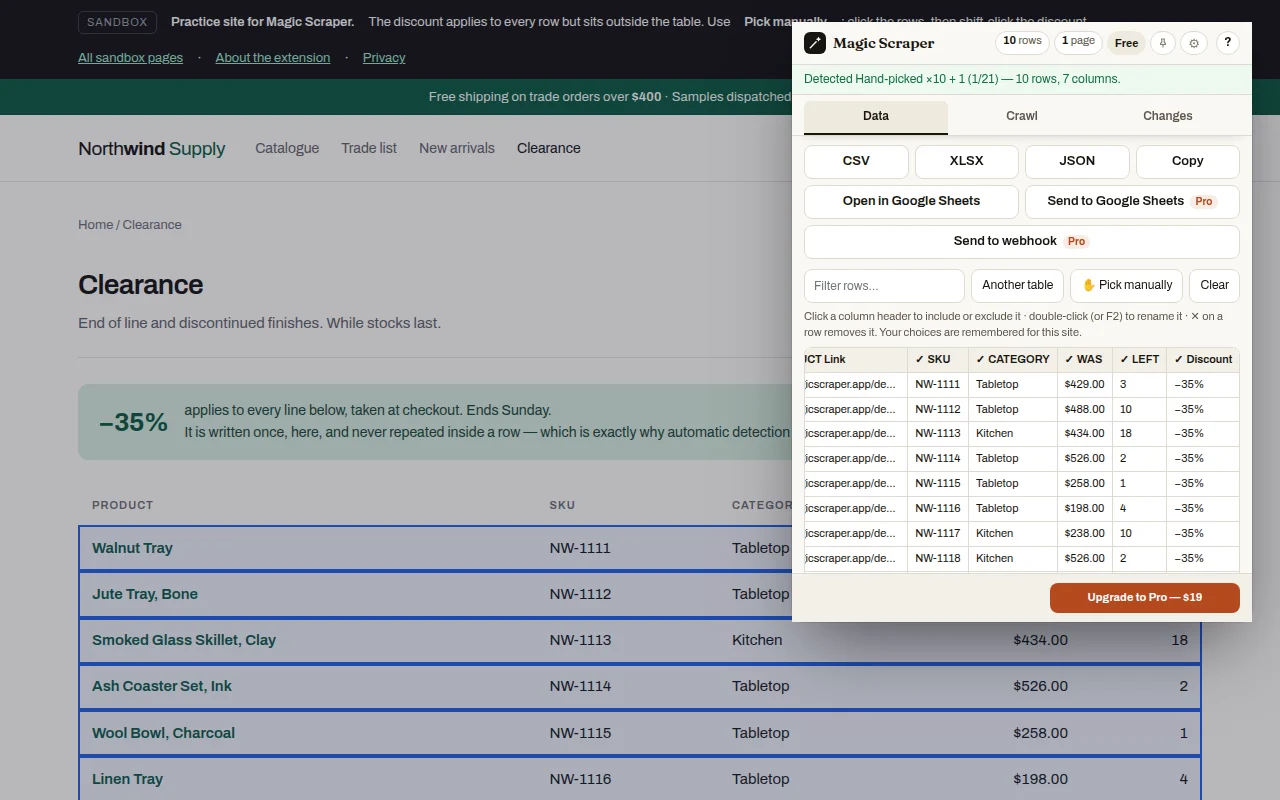
Press ✋ Pick manually and click one row of what you want: the extension finds the rest that look the same. Shift-click any extra field, such as a price that sits outside the row, and it joins as a column.
Open the page behind each row
If the list only shows names, the details may live on each item's own page. Drill-down opens them and adds their fields, free for 3 rows.
Why some pages come back empty
The rows aren't there yet. Pages that load as you scroll hold only what has been shown. Scroll first, or crawl it as infinite scroll.
The data is in a frame from another site. Maps, booking widgets and embedded tables often come from a different address inside the page. Open that address in its own tab and scrape it there.
It isn't text. Prices drawn as images, charts drawn on a canvas and tables inside a PDF have no text for any scraper to read.
You're not signed in, or the session expired. Magic Scraper runs in your own browser, so it sees pages you are signed into, the same as you do. It never signs in for you. Check the site's terms before collecting from pages behind a login.
The page is a check, not the content. "Just a moment", "verify you're human" or "access denied" pages have nothing to scrape. Magic Scraper stops and hands you the tab rather than trying to get past them.
Sites no honest tool should promise
Some of the most requested sites, LinkedIn and Facebook among them, forbid automated collection in their terms and actively detect scraping extensions. A tool that promises them is promising to break those rules on your account. Magic Scraper doesn't, and won't get past captchas or bot checks.
For business lists, the same companies are usually in public directories that are made to be read: see where local business lists live and scraping a business directory.
Tell us which site
If a public page should work and doesn't, send the address from support, or copy a diagnostic report from the extension's menu: it holds errors only, with web addresses removed. Sites that fail for many people are fixed in the next update.
Reasonable questions
Why does my scraper say it doesn't support this site?
Usually the rows haven't loaded yet, the data sits in a frame from another site, it's an image or PDF rather than text, the page needs a sign-in, or it's a bot check page. Wait and scroll, try another table, or pick the rows by hand.
How do I scrape a page where automatic detection fails?
Click one row of what you want and the extension selects the rest that look the same. Shift-click extra fields to add them as columns.
Can it scrape pages I'm logged into?
It reads what your browser shows, including pages you're signed into, and never signs in for you. Whether you may collect from those pages depends on the site's terms.
Does it work on LinkedIn?
No, and it doesn't try. LinkedIn's terms forbid automated collection and it detects scraping extensions.
Can it get past captchas?
No. When a site shows a human check, the run stops and hands you the tab.
Why does my scraper return an empty CSV?
The page was read before its rows appeared, or the wrong list was selected. Check the preview before exporting: if it shows the right rows, the file will too.